.jpg)
API Data Flow Visual Overview – Enterprise Backed Configuration
This page provides a visual representation of the API dependencies and data flow used during Enterprise Backend Configuration for selling travel connectivity.
It helps you understand:
-
The typical order of API calls
-
Which APIs are supplementary (used to retrieve required values)
-
Which identifiers must be stored in your backend
-
How outputs from one step become inputs to the next
This page complements the detailed configuration pages and does not replace the API reference.
How to Use This Page
Use this page as:
-
A design reference when building your backend integration
-
A checklist to ensure all prerequisites are in place
-
A troubleshooting aid when an API call fails due to missing identifiers
Recommended approach:
-
Read the diagram to understand dependencies
-
Use the mapping table to implement data storage and parameter sourcing
-
Link your portal product model to the stored identifiers (rate zones, plans, endpoints)
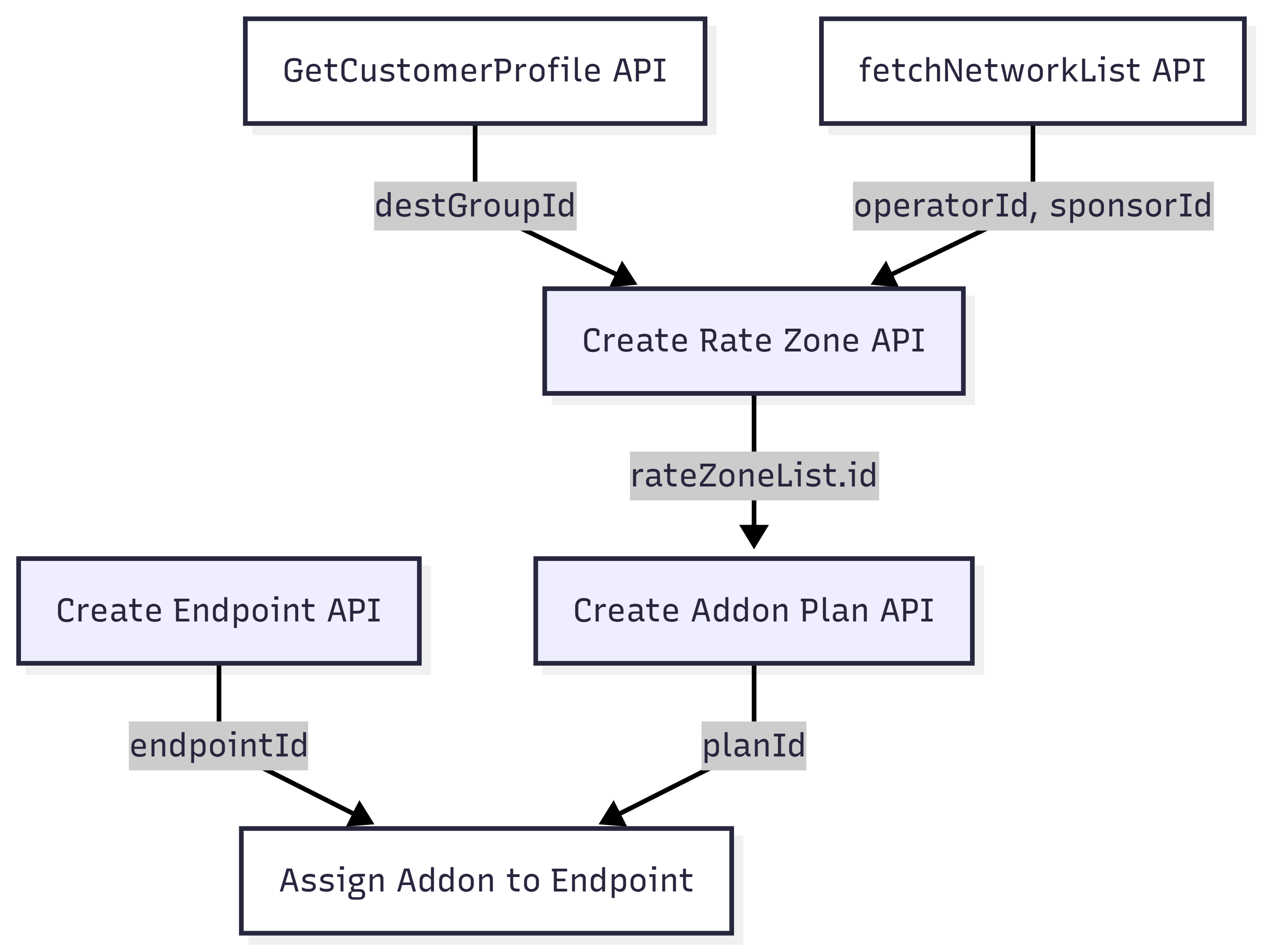
API Dependency Diagram
-
GetCustomerProfileandfetchNetworkListare supplementary APIs used to retrieve required input values. -
Create Rate Zone,Create Addon Plan, andCreate Endpointare the core configuration actions. -
Assign Addon to Endpointis shown to illustrate where theplanIdandendpointIdare used later.
Parameter & Identifier Mapping Table
This table shows where key input parameters come from and which outputs must be stored for later steps.
|
Step |
API / Action |
Key Inputs |
Source of Inputs |
Key Outputs to Store |
Used Later In |
|---|---|---|---|---|---|
|
1 |
GetCustomerProfile |
— |
SFT |
destGroupId |
Create Rate Zone |
|
2 |
fetchNetworkList |
— |
SFT |
operatorId |
Create Rate Zone |
|
|
|
|
|
categoryGroupId (= sponsorId) |
Create Rate Zone |
|
3 |
Create Rate Zone |
destGroupId, operatorId, sponsorId |
Steps 1–2 |
Create Addon Plan |
|
|
4 |
Create Addon Plan (Create Plan API) |
benefit.rateZone |
Step 3 |
planId |
Assign Addon to Endpoint |
|
5 |
Create Endpoint / Create Bulk Endpoint |
name, iccid, isDefaultActivation=false |
Portal / SIM inventory |
endpointId |
Assign Addon to Endpoint |
|
6 |
Assign Addon to Endpoint |
endpointId, planId |
Steps 4–5 |
|
|
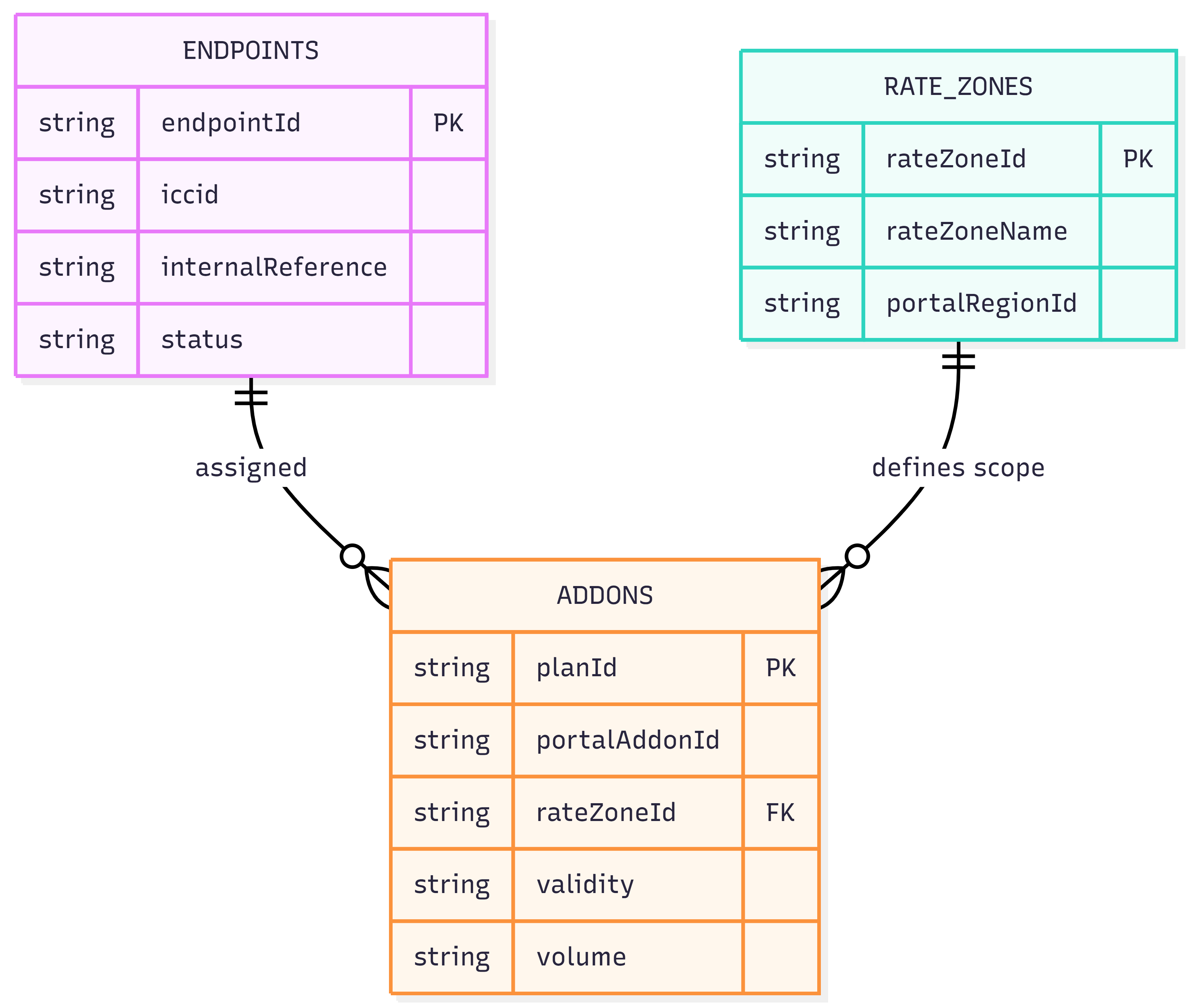
Recommended Backend Data Model
To integrate reliably with the SFT platform, Customer X should maintain a minimal set of backend tables that persist the identifiers returned by SFT APIs and link them to the customer’s own portal entities.
These mappings allow Customer X to:
-
Reuse identifiers across API calls
-
Correlate portal products with SFT configuration
-
Manage lifecycle actions (activation, addon assignment, renewal)
1. Endpoint ↔ SIM Mapping
Customer X should maintain a table that links endpoints created in SFT with the SIMs assigned to them.
Purpose
-
Track which SIM is linked to which endpoint
-
Support activation, addon assignment, and lifecycle operations
-
Enable reconciliation between portal orders and SFT objects
Recommended fields
-
endpointId(returned by Create Endpoint / Create Bulk Endpoint API) -
iccid(SIM identifier assigned by Customer X) -
Optional internal references (order ID, customer ID, status)
This mapping is essential because all operational APIs use the endpointId, while the portal and inventory typically reference SIMs.
2. Rate Zone ↔ Portal Offering Mapping
Customer X should maintain a table containing all Rate Zones created in SFT and how they map to the regions or destinations offered in the portal.
Purpose
-
Link portal destinations (countries / regions) to SFT Rate Zones
-
Reuse Rate Zones when creating or updating Addon Plans
-
Support coverage updates and validation
Recommended fields
-
rateZoneId(returned asrateZoneList.id) -
rateZoneName(human-readable name) -
Internal portal region or destination identifier
This mapping allows Customer X to consistently reference the correct Rate Zone when defining Addon benefits.
3. Addon ↔ Portal Product Mapping
Customer X should maintain a list of Addon Plans created in SFT and map them to the add-ons offered through the customer portal.
Purpose
-
Identify which SFT Addon corresponds to a portal product
-
Assign the correct Addon to an endpoint after purchase
-
Support renewals, reassignments, and lifecycle management
Recommended fields
-
planId(returned by Create Plan API for Addon Plans) -
Portal addon identifier (SKU, product ID, name)
-
Associated
rateZoneIdused in the Addon benefit -
Optional attributes (validity, volume, activation mode)
This mapping ensures that when a traveler purchases an add-on in the portal, Customer X can assign the correct Addon Plan to the endpoint without ambiguity.
Backend Data Model