.jpg)
API Data Flow Visual Overview – Traveler eSIM Add-on Purchase & Activation
This page provides a visual and conceptual overview of the API flow and dependencies involved when a traveler purchases an eSIM add-on via the Customer X Portal and the system activates and assigns it in SFT.
It helps you understand:
-
The end-to-end sequence of API calls during add-on purchase
-
Which APIs are operational vs supplementary
-
Which identifiers must be stored by the backend
-
How outputs from one step become inputs to the next
-
Where portal actions map to SFT lifecycle operations
This page complements the detailed API reference and does not replace it.
How to Use This Page
Use this page as:
-
A design reference when implementing the traveler purchase flow
-
A checklist to ensure required identifiers are available before each API call
-
A troubleshooting aid when add-on activation or delivery fails
-
A bridge between business flow and technical execution
Recommended approach:
-
Read the diagram to understand dependencies and sequencing
-
Use the mapping table to persist required identifiers
-
Ensure portal purchase logic aligns with SFT lifecycle expectations
API Dependency Diagram – Traveler Purchase Flow
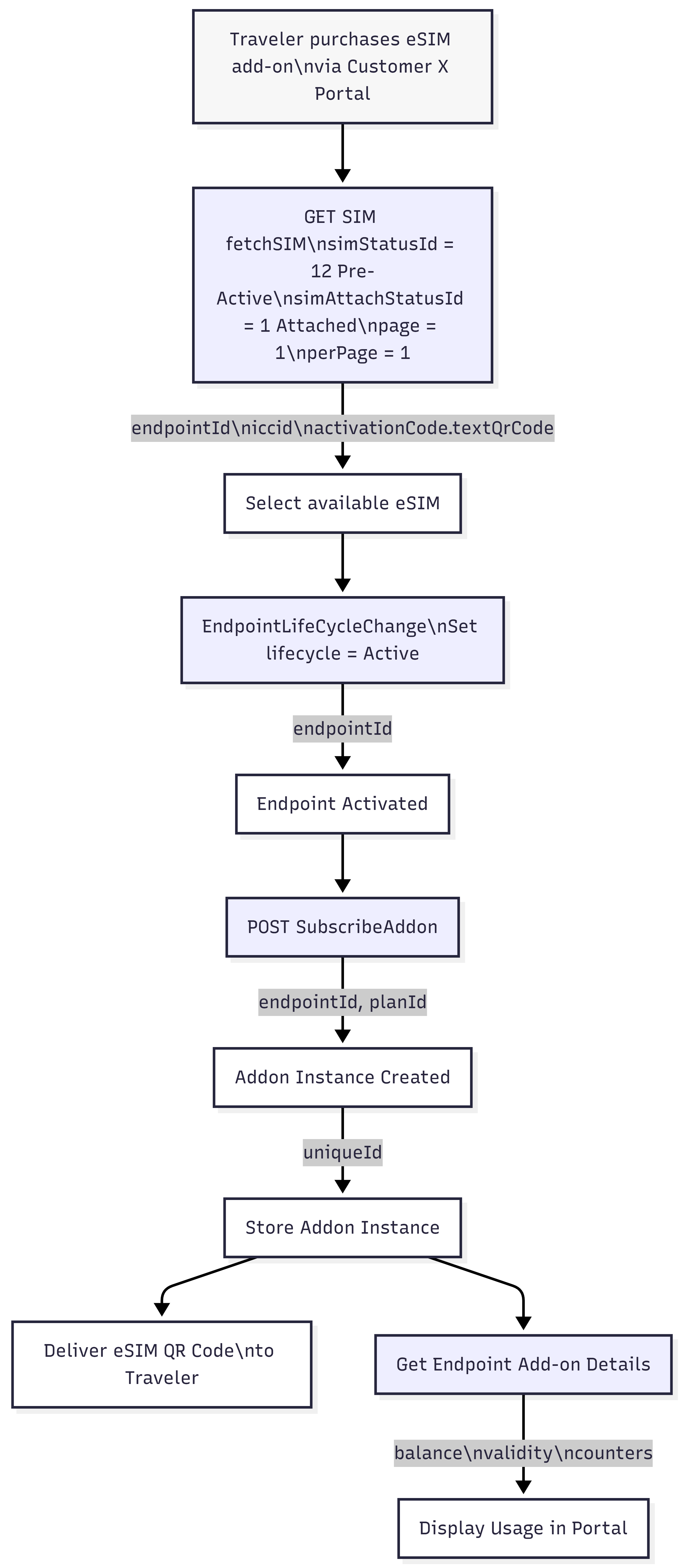
The diagram illustrates the happy path from portal purchase to QR code delivery and usage monitoring.
High-level flow:
-
Traveler purchases an eSIM add-on in the portal
-
Backend retrieves an available Pre-Active & Attached SIM
-
Endpoint lifecycle is moved to Active
-
Add-on plan is subscribed to the endpoint
-
Add-on instance is stored and QR code is delivered
-
Usage and balance are retrieved for portal display
Core Operational APIs
These APIs change state or create runtime objects:
-
EndpointLifeCycleChange -
SubscribeAddon
Supplementary / Retrieval APIs
These APIs are used to fetch required inputs or status:
-
GET SIM (fetchSIM) -
Get Endpoint Add-on Details
Parameter & Identifier Mapping Table
This table shows where key inputs come from and which outputs must be stored for later steps.
|
Step |
API / Action |
Key Inputs |
Source of Inputs |
Key Outputs to Store |
Used Later In |
|---|---|---|---|---|---|
|
1 |
Traveler Purchase |
Portal product, traveler context |
Customer Portal |
— |
Trigger flow |
|
2 |
GET SIM (fetchSIM) |
simStatusId = Pre-Active<br/>simAttachStatusId = Attached |
SFT |
endpointId<br/>iccid<br/>activationCode.textQrCode |
Activation |
|
3 |
EndpointLifeCycleChange |
endpointId |
Step 2 |
endpoint lifecycle = Active |
Add-on subscription |
|
4 |
SubscribeAddon |
endpointId<br/>planId |
Portal config + Step 3 |
addonInstanceId (uniqueId) |
Storage, tracking |
|
5 |
Get Endpoint Add-on Details |
endpointId |
Step 4 |
balance<br/>validity<br/>counters |
Portal UI |
Recommended Backend Data Model
To integrate reliably with SFT during traveler runtime operations, Customer X should persist a minimal but consistent set of identifiers.
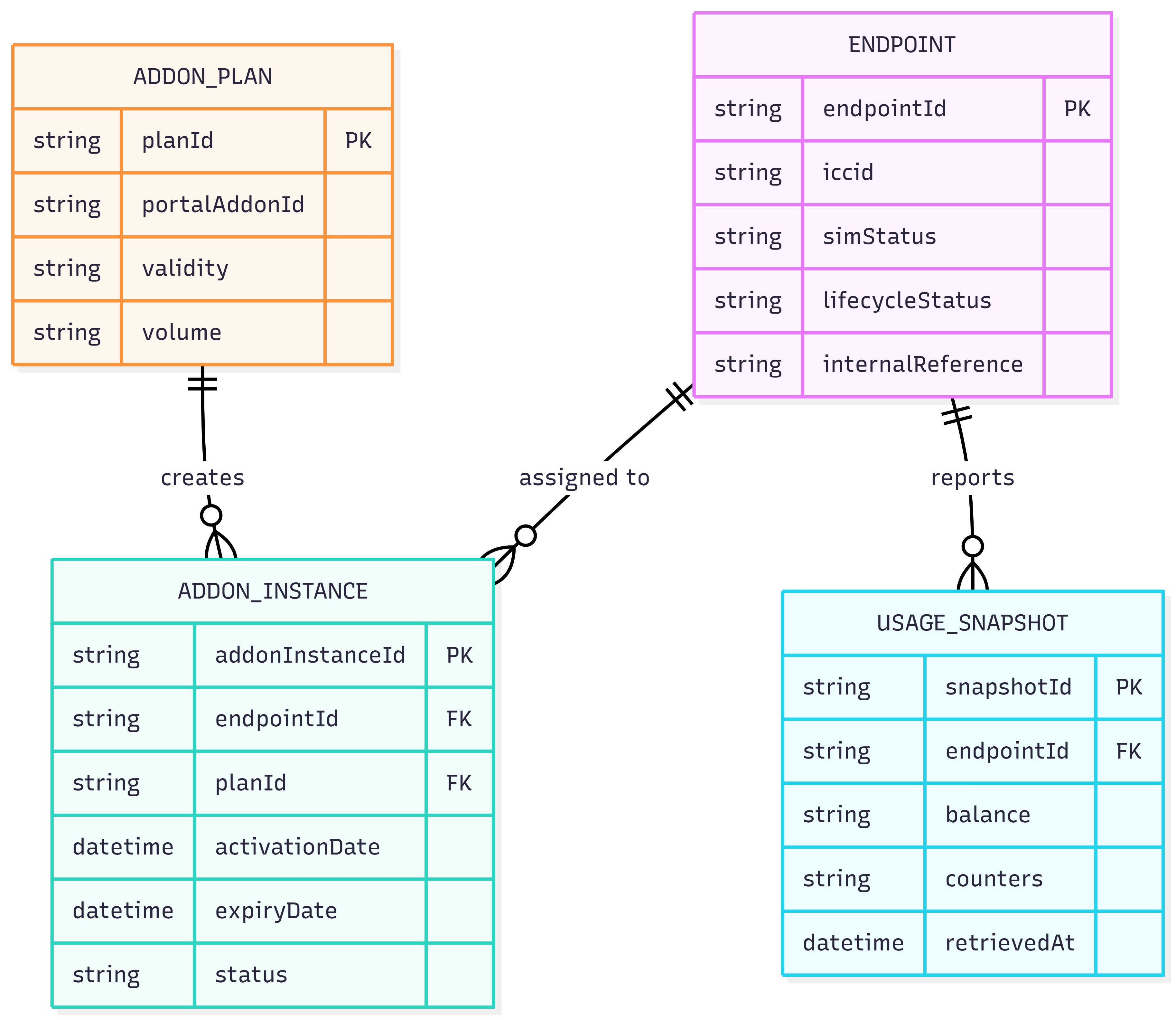
1. Endpoint ↔ SIM Runtime Mapping
Purpose
-
Track which SIM / endpoint is used for a traveler session
-
Support activation, add-on assignment, and QR delivery
-
Enable reconciliation between purchase and SFT execution
Recommended fields
-
endpointId -
iccid -
activationCode.textQrCode -
Portal order ID
-
Runtime status (selected, activated, delivered)
2. Add-on Instance Tracking
Purpose
-
Track which add-on instance was created for a traveler
-
Support monitoring, retries, and customer support
-
Enable usage and balance queries
Recommended fields
-
addonInstanceId(uniqueId) -
endpointId -
planId -
Purchase timestamp
-
Validity window
-
Current status
3. Portal Usage & Monitoring View
Purpose
-
Display near-real-time usage to the traveler
-
Correlate SFT counters with portal UI
-
Detect exhausted or expired add-ons
Recommended fields
-
endpointId -
Balance
-
Validity
-
Counters
-
Last refresh timestamp
Important Notes & Assumptions
-
SIMs used in this flow must already be:
-
Attached
-
Pre-Active
-
-
Endpoint creation and add-on plan configuration are out of scope for this flow
-
Error handling (no SIM available, activation failure, subscription failure) should be implemented as separate fallback flows
-
QR code delivery is assumed to be synchronous after successful subscription