.jpg)
1. Overview
DataStream Cloud Access is a resilient way to receive your DataStream data on the SIM for Things platform. Instead of relying on the platform pushing events to your endpoint via callbacks, where outages or processing delays can cause data loss, every generated file is stored securely in the cloud, and you retrieve it via API on your own schedule.
With this pull-based approach, you have full control over ingestion, you eliminate the risk of missing data because of endpoint unavailability, and you keep a 7-day window to reconcile or replay any file.
Typical use cases include:
-
Receiving DataStream files reliably without depending on endpoint availability at the exact moment of delivery.
-
Recovering data after a callback endpoint outage or missed callbacks.
-
Re-downloading specific DataStream records for reconciliation or audit.
-
Adding a resilient ingestion layer on top of, or in place of, callback delivery.
2. Prerequisites
DataStream Cloud Access builds on your existing DataStream configuration: the files made available in the cloud are the files generated for your callback DataStreams. Before the feature can be enabled on your account, the following must be in place:
-
A configured callback DataStream. At least one DataStream with stream type Callback API must already be configured on your account for the event type you want to retrieve — Usage Events and/or Mobility Events. See Create Data stream and Callback API.
-
The DataStream ID(s). Share the ID of each callback DataStream you want to use with your Proximus Global · BICS account team or SIM for Things support. Cloud Access is enabled for these DataStreams. You can find the ID under View Data stream.
-
Valid SIM for Things API credentials for the account on which the feature is enabled.
A callback DataStream is mandatory
DataStream Cloud Access cannot be enabled on an account without a configured callback DataStream. If you do not have one yet, create it first and then send the DataStream ID(s) to your account team or support to complete the activation.
3. How It Works
The platform generates DataStream data for supported processes such as Usage Events and Mobility Events. Normally, this data is sent to you via your configured callback endpoint. With DataStream Cloud Access, the generated data is also stored in secure cloud storage and made available through three dedicated APIs:
-
List available individual DataStream files for a date and process.
-
List hourly zipped archives for a date and process.
-
Request a secure, time-limited download URL for a selected file.
The diagram below summarises the end-to-end flow:
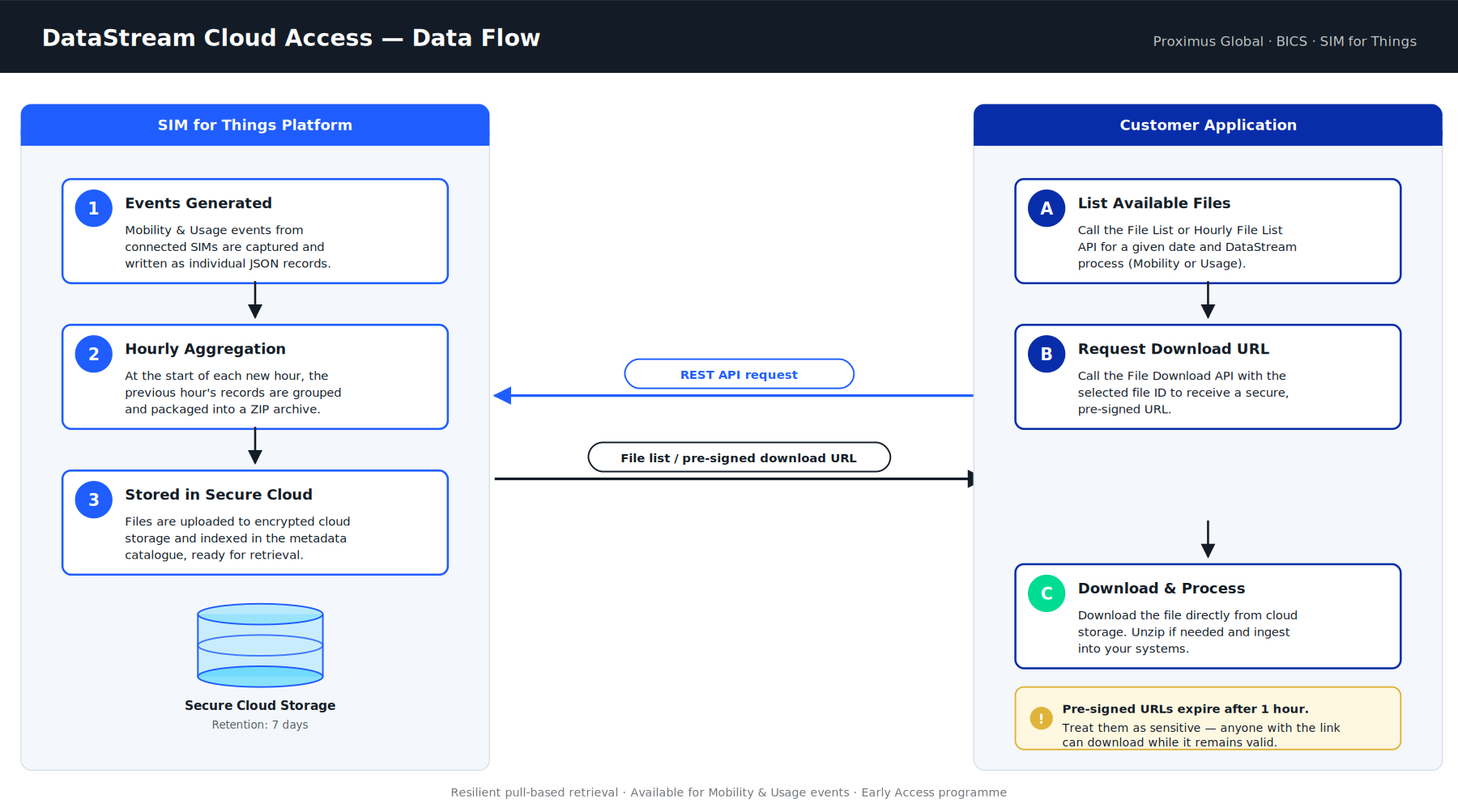
Figure 1. DataStream Cloud Access — end-to-end data flow between the SIM for Things platform and your application.
4. Standard DataStreams vs. DataStream Cloud Access
With standard DataStream callbacks, the platform pushes events to your endpoint in near real-time. While convenient, this push-based model depends entirely on your endpoint being reachable at the moment of delivery — any downtime, network issue, or processing delay on your side can result in lost data that is not automatically retried.
DataStream Cloud Access addresses this by storing every generated file securely in the cloud, where you can retrieve it on your own schedule. This pull-based approach gives you full control over ingestion, eliminates the risk of data loss from endpoint unavailability, and provides a 7-day window to reconcile or replay any file. The table below summarises the key differences between both delivery models:
|
Capability |
Standard DataStream Callback |
DataStream Cloud Access |
|---|---|---|
|
Delivery model |
Platform pushes data to customer API |
Customer retrieves data using APIs |
|
Main purpose |
Near real-time delivery |
Individual JSON files available near real-time (within minutes); hourly ZIP archives at HH:00:01 of the next hour. Both retained for up to 7 days for recovery and replay. |
|
Customer dependency |
Customer endpoint must be available |
Customer can retrieve data later |
|
Failure handling |
Limited retry; data may be lost on prolonged outages |
Data can be retrieved from cloud storage |
|
Data format |
Callback payload |
Individual JSON files or hourly ZIP archives |
|
Availability |
Immediate callback delivery. Not stored after delivery. |
Stored for 7 days. |
5. Available File Formats
DataStream Cloud Access stores data in two formats. Choose the one that best fits your retrieval scenario:
5.1 Individual DataStream Files (JSON)
Individual files represent specific DataStream records, written as JSON. Each file becomes available within a few minutes of the underlying event being generated, making this format suitable for near-real-time retrieval. Use these when you need to retrieve one or a few specific records for a given date and DataStream process.
Filename example: 42421854_10012_20250716_0000001_1.json
5.2 Hourly Zipped Archives
At the start of each new hour (HH:00:01), the platform groups all JSON files generated during the previous hour into a single ZIP archive. Unlike individual JSON files, ZIP archives are not near-real-time — each archive only becomes available once the hour it covers has ended. Use these when you need to recover a larger volume of data — for example, after your callback endpoint was offline for a period of time.
Filename example: 42421854_10012_20250716_06_0000013_0000027_15.zip
Naming convention: {AccountId}_{CallbackProcessId}_{Date}_{Hour}_{StartCallbackIndex}_{EndCallbackIndex}_{NumberOfFiles}.zip
6. Available APIs
Three RESTful APIs are exposed for DataStream Cloud Access. All APIs require valid SIM for Things authentication credentials. The exact authentication method, headers and request format are documented in the Postman reference linked below.
During the Early Access programme, the full interactive API specification — including request/response schemas, parameter details, and ready-to-run examples — is published via Postman:
Interactive API documentation: https://api.sft.bics.com , alongside the rest of the SIM for Things API reference.
The reference summary below covers the three endpoints, their parameters, and sample requests and responses for quick orientation.
6.1 List Individual DataStream Files
Returns the list of individual JSON files available for a given date and DataStream process.
Endpoint: GET https://api.sft.bics.com/dataStreamFileList
Query parameters
|
Parameter |
Type |
Required |
Description |
|---|---|---|---|
|
date |
string |
Yes |
Format: yyyymmdd. Current date plus 6 days in the past are supported. |
|
callbackProcessId |
string |
Yes |
10012 = Usage Events (Bulk)
|
Sample request
GET https://api.sft.bics.com/dataStreamFileList?date=20250722&callbackProcessId=10012
Sample response
{
  "Response": {
    "rows": [
      {
        "files": [
          {
            "filename": "42421854_10012_20250716_0000001_1.json",
            "date": "20250716",
            "callbackIndex": "0000001",
            "recordCount": 1,
            "uniqueFileId": 1
          }
        ]
      }
    ]
  }
}
6.2 List Hourly Zipped Archives
Returns the list of hourly ZIP archives available for a given date and DataStream process. Use this API to recover a larger volume of data after a downtime window on your callback endpoint.
Endpoint: GET https://api.sft.bics.com/dataStreamzippedFileList
Query parameters
Same parameters as the File List API: date (yyyymmdd) and callbackProcessId, both mandatory.
Sample request
GET https://api.sft.bics.com/dataStreamzippedFileList?date=20250722&callbackProcessId=10012
Sample response
{
  "Response": {
    "rows": [
      {
        "zippedFiles": [
          {
            "zipFilename": "42421854_10012_20250716_00_0000001_0000005_5.zip",
            "date": "20250716",
            "startCallbackIndex": "0000001",
            "endCallbackIndex": "0000005",
            "noOfFiles": 5,
            "uniqueFileId": 1
          }
        ]
      }
    ]
  }
}
6.3 Request Secure Download URL
Returns a pre-signed, time-limited URL that allows you to securely download the selected file directly from cloud storage. Use this API after you have identified the file or ZIP archive you want to download via one of the listing APIs above.
Endpoint: GET https://api.sft.bics.com/api/dataStreamDownload
Query parameters
|
Parameter |
Type |
Required |
Description |
|---|---|---|---|
|
accountid |
string |
Yes |
Your customer account identifier (Reseller or Enterprise). |
|
date |
string |
Yes |
Date of the file, in yyyymmdd format. |
|
uniquefileid |
integer |
Yes |
Sequence number of the file as returned by the File List or Zipped File List API. |
|
filetype |
string |
Yes |
Either json (individual file) or zip (hourly archive). |
Sample request — Individual JSON file
GET https://api.sft.bics.com/api/dataStreamDownload
  ?accountid=42421854
  &date=20250716
  &uniquefileid=543
  &filetype=json
Sample request — Hourly ZIP archive
GET https://api.sft.bics.com/api/dataStreamDownload
  ?accountid=42421854
  &date=20251022
  &uniquefileid=543
  &filetype=zip
Sample response
{
  "response": {
    "responseId": "1761310542975474500",
    "responseTimestamp": "24/10/2025 12:55:43",
    "resultCode": "0",
    "resultParam": {
      "resultCode": "1000",
      "resultDescription": "S3 Download success"
    },
    "responseParam": {
      "download_urls": [
        "https://d38hwn8qducgs6.cloudfront.net/zippedfiles/42421854/..."
      ],
      "expires_at": "24/10/2025 13:55:43"
    }
  }
}
Pre-signed URLs expire after 1 hour
Treat the returned download URL as a sensitive credential. Anyone with the link can download the file while the URL is valid. If a URL expires before you download the file, simply call the Download URL API again to obtain a fresh one.
7. Recommended Customer Workflows
7.1 Scenario 1 — Recover one or a few missed records
-
Call the File List API for the required date and DataStream process.
-
Identify the required individual file in the response.
-
Call the Download URL API using the file's
uniquefileidandfiletype=json. -
Download the file using the returned secure URL.
7.2 Scenario 2 — Recover data after callback endpoint downtime
-
Identify the date and approximate time window of the outage.
-
Call the Hourly Zipped File List API for the required date and process.
-
Identify the hourly ZIP archives covering the downtime period.
-
Call the Download URL API for each required ZIP archive (
filetype=zip). -
Download and unzip each archive.
8. Error Handling
All APIs return a structured response object. Common error scenarios:
Missing or wrong parameters
If date or callbackProcessId is missing or malformed, the API returns a non-zero resultCode with a description. Example:
{
  "response": {
    "responseId": "1762835353055949500",
    "responseTimestamp": "10/11/2025 04:29:13",
    "resultCode": "1",
    "resultParam": {
      "resultCode": "50108",
      "resultDescription": "Wrong Input parameter - uniquefileId"
    }
  }
}
Invalid date format
Dates must always be in yyyymmdd format (e.g. 20251024).
Wrong file type
Only json or zip are accepted as values for the filetype parameter on the Download URL API.
Expired URL
If a pre-signed URL expires before you download the file, simply request a new one via the Download URL API.
9. Security & Data Retention
-
All DataStream files are stored in secure cloud storage.
-
Download URLs are pre-signed and time-limited (valid for 1 hour from generation).
-
Treat download URLs as sensitive — anyone with the URL can download the file while it is valid.
-
Files are retained for 7 days from the time of generation. After that, they are automatically removed.
-
All API calls require valid SIM for Things authentication credentials (see the Postman reference for details).
10. Best Practices
-
Use DataStream Cloud Access as a resilient ingestion path — by polling on a regular schedule, you avoid the data loss risk that comes with depending on your endpoint being available at the moment of delivery.
-
If you continue to use callbacks for near real-time signals, pair them with Cloud Access to reconcile and recover any data that was missed.
-
Schedule periodic reconciliation jobs (for example, daily) to verify completeness against the callback stream.
-
Always use the yyyymmdd date format and verify the
callbackProcessIdbefore calling. -
Build your client to handle URL expiry gracefully by re-requesting a fresh URL when needed.
-
Automate listing and download via your preferred scripting language — all APIs are RESTful.
11. Frequently Asked Questions
Q. What do I need before DataStream Cloud Access can be enabled?
A callback DataStream must already be configured on your account for the event type you want to retrieve (Usage and/or Mobility Events). Share the DataStream ID(s) with your Proximus Global · BICS account team or support, who will then enable Cloud Access. See section 2, Prerequisites.
Q. What if I don't see any files in the response?
Confirm with your Proximus Global · BICS account team that DataStream Cloud Access is enabled on your account, and that a callback DataStream is configured for the relevant event type. Also check that you are using the correct callbackProcessId (10012 for Usage, 10013 for Mobility) and a valid date within the 7-day retention window.
Q. Can I automate downloads?
Yes — all three APIs are RESTful and can be integrated into scripts or applications.
Q. How long are files retained?
Files are kept in cloud storage for 7 days from the time of generation, then automatically removed.
Q. What happens if I use the wrong filetype?
The Download URL API will return an error stating that only json or zip are accepted.
Q. Does DataStream Cloud Access replace my callbacks?
It can. Cloud Access is fully production-ready and can serve as your primary ingestion path, with the advantage that no data is lost when your endpoint is unavailable. Callbacks remain available alongside Cloud Access — both can be used together if you want low-latency notifications via callbacks while relying on Cloud Access as the resilient source of truth. Note that the callback DataStream itself must remain configured on your account, as Cloud Access stores the files generated for that DataStream.
12. Glossary
|
Term |
Definition |
|---|---|
|
AccountId |
Your customer account identifier (Reseller or Enterprise). |
|
CallbackProcessId |
Numeric identifier for the DataStream type. 10012 = Usage Events, 10013 = Mobility Events. |
|
CallbackIndex |
Sequential index assigned to each generated file for a given date and DataStream process. |
|
DataStream ID |
Identifier of a DataStream configured on your account. Required to enable DataStream Cloud Access. |
|
uniqueFileId |
Sequence number of a specific file in the metadata catalogue. Used as input to the Download URL API. |
|
Pre-signed URL |
Time-limited, secure URL that grants temporary access to a single file in cloud storage. Valid for 1 hour. |
|
DataStream |
Continuous stream of event data (Mobility or Usage) generated by the SIM for Things platform. |
13. Summary
DataStream Cloud Access gives you a resilient, pull-based way to receive your Mobility and Usage event data from the SIM for Things platform. Files are stored securely in the cloud and made available for retrieval on your schedule, eliminating the data loss risk that comes with depending on your endpoint being available at the exact moment of delivery. You can adopt Cloud Access as your primary ingestion path, or run it alongside DataStream callbacks for additional flexibility.
For more information, contact your Proximus Global · BICS account team or visit https://api.sft.bics.com .