.jpg)
An endpoint is a virtual representation of a physical IoT or other device (such as an M2M device, mobile phone or other connected device) that uses a SIM card for connectivity.
Key points about endpoints in SIM for Things:
-
Device Representation: The endpoint represents the actual IoT device in the portal. The SIM card is just a connectivity module linked to this endpoint.
-
SIM Relationship: Each endpoint is linked to one SIM card, and each SIM card can only be linked to one endpoint at a time. However, SIM cards can be swapped, linked, or de-linked from endpoints, but all device management configurations remain with the endpoint.
-
Configuration and Management: All configurations (such as service profiles, rate zones, tariffs, coverage, and plans) are assigned to the endpoint. Usage data (data/SMS) and charges are always accrued through the endpoint.
-
Lifecycle and States: Endpoints have their own lifecycle and states, and the state of a SIM is controlled by the endpoint it is linked to.
-
Unique Identifier: Each endpoint is assigned a unique endpointID by the platform, which is used for identification and management.
-
Other Elements: Endpoints can have associated APN groups, billing types (prepaid or postpaid), plans, roaming profiles, and optional features like IMEI lock and tags for grouping.
Summary:
An endpoint in the SIM for Things portal is the main entity representing your IoT device, holding all configuration, usage, and management information, with the SIM card acting as its connectivity module.
The Endpoints menu is shown when you are working in an enterprise account, because endpoints are managed per customer tenant.
View Endpoint
-
On the menu, click Endpoints to view the endpoint details. Refer to the following screen.
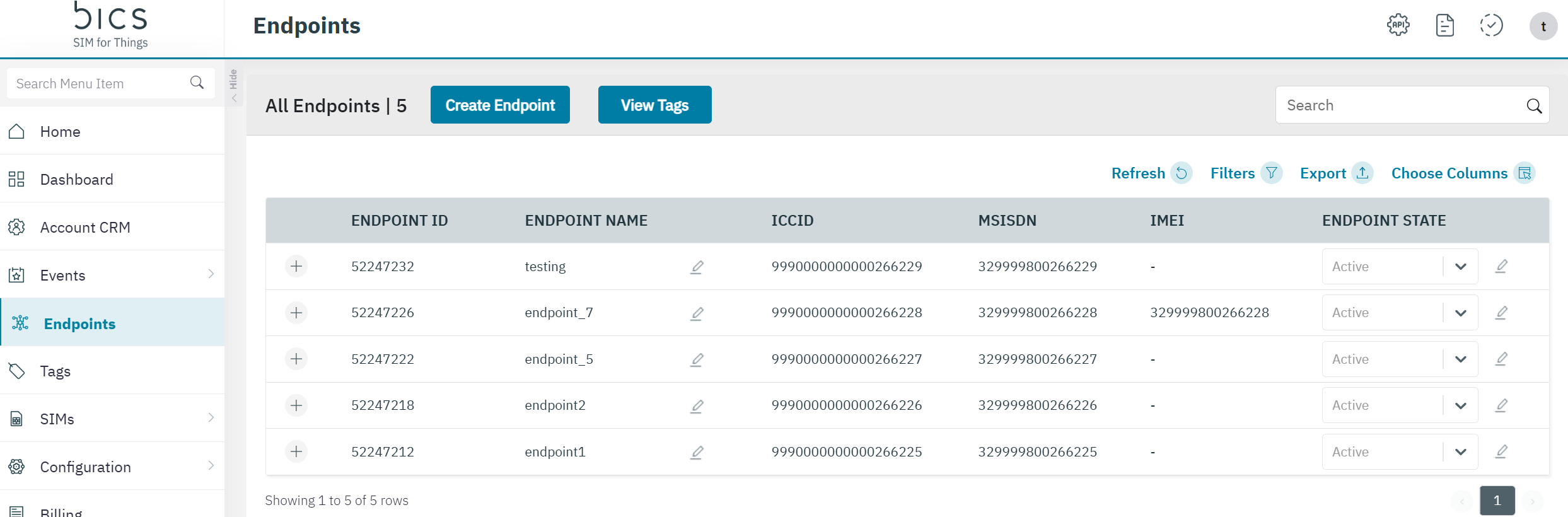
Endpoint table
-
The following Endpoint columns are displayed on the screen.
|
Field |
Description |
|---|---|
|
Endpoint ID |
Indicates the unique reference ID of the endpoint |
|
Endpoint Name |
Indicates the name of the endpoint. |
|
ICCID |
ICCID indicates the serial number of the SIM. ICCID is a unique reference number given for each SIM. |
|
MSISDN |
Indicates the MSISDN of the endpoint |
|
IMEI |
Indicates the IMEI number of the device to which the SIM is attached. |
|
ENDPOINT STATE |
Indicates the state of Endpoint. Click on the pencil icon to change the state.
|
Hidden table columns that can be selected via the Choose Columns.
|
EndpointTagName |
Indicates List of endpoint Tag Name, Hidden column |
|
Billing Type |
Indicates the billing type POSTPAID or PREPAID , Hidden column |
|
Plan |
Indicates the name of the plan which is attached to the endpoint, Hidden column |
|
Roaming Profile |
Indicates the name of the Roaming Profile which is attached to the endpoint, Hidden column |
|
Dynamic Benefit(s)” |
Indicates the name of the Dynamic Benefit which is attached to the endpoint, Hidden column |
|
Addon Name |
|
|
Value added feature |
For every endpoint, the list of currently attached value added features will be displayed under the endpoint details with the option to edit the list to add features or to remove features. Value added features is an optional field, drop-down list allowing multi-selection from the “Feature name” values of the “Value Added Feature” configurations of “Type”=“Feature The same value added feature can be activated for an endpoint only once. |
|
Barring |
If all services are unbarred it is considered as NO, If even one of the above is Barred we consider as YES. |
|
IMEI LOCK |
Indicates the IMEI lock status, LOCKED or UNLOCKED , Hidden column |
|
Frist Activation Date and time |
Indicates date and time of when the endpoint became active,Hidden column |
The other endpoint functionalities are described here: