.jpg)
Overview Details
-
On the Endpoints screen, click on the “+” icon that is visible on the left side of that Endpoint to expand the Endpoint details.
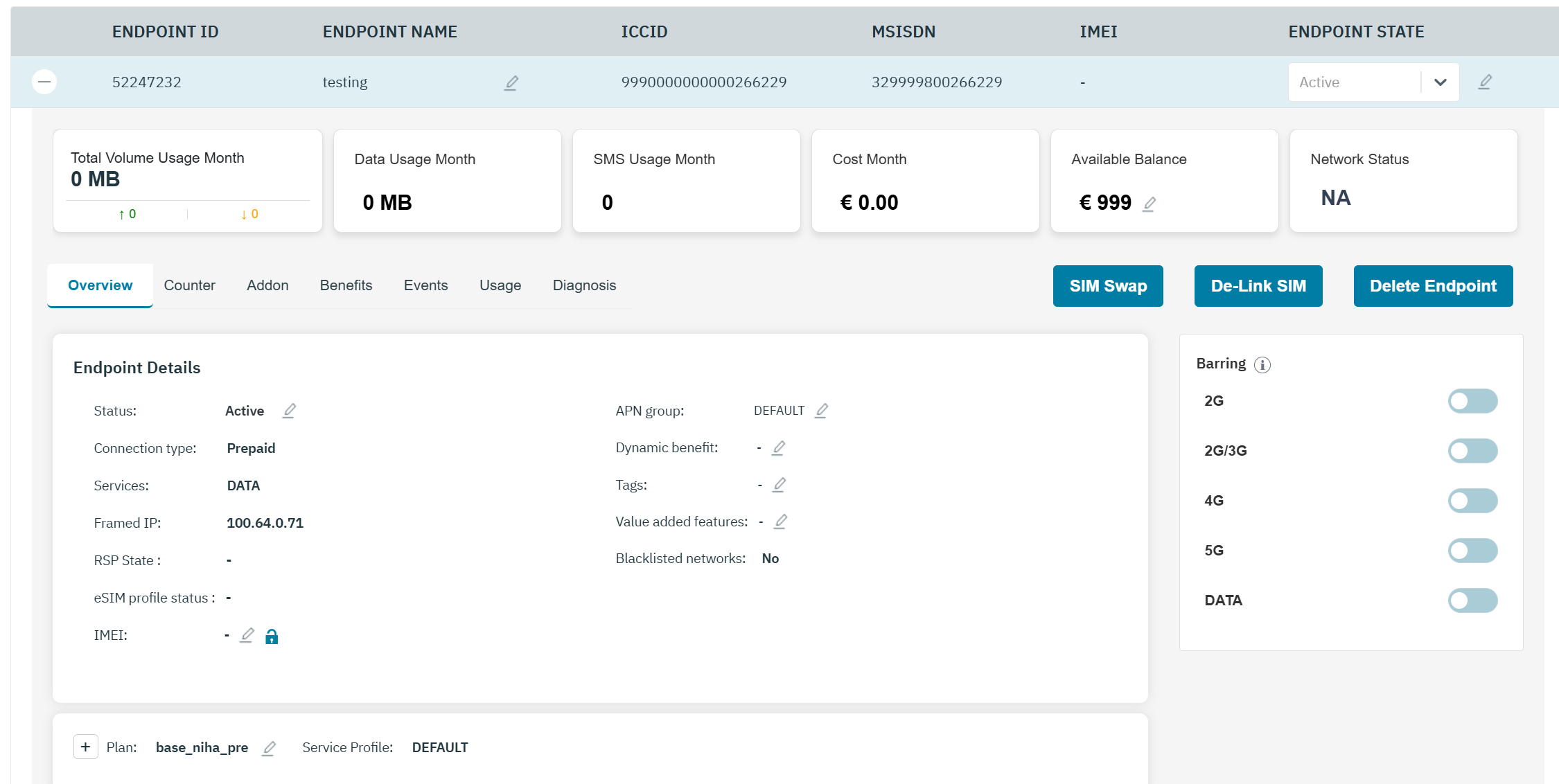
Endpoint widgets
|
Total Volume Usage Month |
Indicates the usage uplink and downlink |
|
Data Usage Month |
Indicates the data usage for the current month |
|
SMS Usage Month |
Indicates the SMS usage count for the current month |
|
Cost Current Month |
Indicates the charges for the current month |
|
Monthly Limit |
Indicates the monthly limit of the endpoint
|
|
Available Balance |
Indicates the current account balance of the endpoint
|
|
Network Status |
Indicates the current network status of the SIM and other details. For example, the current network is Airtel, country is India and status of the network is "Connected to NB-IOT services" |
Endpoint Details
|
Status |
Indicates the status of the endpoint.
Depending on the current status of the endpoint, you can change the endpoint status as below.
|
|
Connection Type |
Indicates the billing type Postpaid or Prepaid |
|
Services |
Indicates the Services attached to the plan. For example DATA, SMS |
|
Framed IP |
the IP address assigned to a device during a data session, typically via a RADIUS server during authentication. This is formally known as the Framed-IP-Address attribute in RADIUS protocol |
|
RSP state |
RSP state refers to the status of a SIM profile managed via Remote SIM Provisioning (RSP). It indicates the SGP.02 RSP state. Example Global or Local. |
|
eSIM profile status |
Indicates the step reached within the eSIM Profile Download and Installation procedure:
Note: eSIM Profile Status of 'error' is generic and could be caused by different reasons as specified in 5.2.6.2 section of SGP.22. Few examples of Reason Codes are,
|
|
APN Group |
Indicates the APN group of the endpoint.
|
|
IMEI |
Indicates the IMEI number of the device.
Click the unlock icon to unlock the IMEI number. Note: By default, the IMEI number of the device is unlocked.
|
|
Dynamic Benefit |
It indicates the names of Dynamic Benefits the Endpoint is subscribed to.
|
|
Tags |
Indicates the name of the Tags .
|
|
Value added feature |
For every endpoint, the list of currently attached value added features will be displayed under the endpoint details with the option to edit the list to add features or to remove features. Value added features is an optional field, drop-down list allowing multi-selection from the “Feature name” values of the “Value Added Feature” configurations of “Type”=“Feature The same value added feature can be activated for an endpoint only once. |
|
Blacklisted Networks |
Indicates that there are blacklisted networks for an endpoint
|
Barring
Barring Note: Depending on the Service profile selected, service available for the endpoint varies. In this example, 2G/3G/4G/5G services are available for this endpoint.
|
2G/3G |
Push button to bar or unbar the 2G and 3G services. After barring, the endpoint cannot use 2G and 3G services but can use 4G service and 5G service |
|
4G |
Push button to bar or unbar the 4G service. After barring, the endpoint cannot use 4G service but can use 2G, 3G, and 5G services. |
|
5G |
Push button to bar or unbar the 5G service. After barring, the endpoint cannot use 5G service but can use 2G, 3G, and 4G services. |
|
NB-IOT |
Push button to bar or unbar the NB-IOT service. After barring, the endpoint cannot use NB-IOT service. |
|
SMS_MO |
Push button to bar or unbar the SMS_MO service. After barring, the endpoint cannot send SMS to another device. |
|
DATA |
Push button to bar or unbar the data services. After barring, the endpoint cannot access the internet using any of the networks (2G, 3G, 4G,5G). |
|
SMS_MT |
Push button to bar or unbar the SMS_MT services. After barring, the endpoint cannot receive SMS from another device. |
Plan
|
Plan |
Indicates the current base plan of the endpoint.
Note: Blacklisting Operator: On changing plan, if blacklisted networks are present for that particular endpoint, then those networks will be removed from the blacklist in both 6D and HSS platform. User has to manually blacklist the networks if needed.
|
|
Connection Type |
Indicates the connection type. For example, Prepaid or Postpaid |
|
Service Profile |
Indicates the name of the Service Profile attached to the plan. |
|
Roaming Profile |
Indicates the name of the Roaming Profile attached to the plan.
Note: Blacklisting Operator: On changing (add/remove) roaming profiles, if blacklisted networks are present for that particular endpoint, then those networks will be removed from the blacklist in both 6D and HSS platform. User has to manually blacklist the networks if needed. |