.jpg)
SIMs
The SIMs menu allows users to view, manage, and track SIM cards and related operations. Available features vary depending on the account type.
Depending if you have an enterprise or reseller account you will get a different result when you click on the SIMs menu.
Enterprise Accounts
-
All SIMs: View and manage all SIM cards assigned to your enterprise account.
-
File Transfer: Access logs and details of file-based SIM provisioning, including uploads and confirmations.
Reseller Accounts
-
All SIMs: View and manage SIM cards across all enterprise accounts under your reseller hierarchy.
-
SIM Transfer History: Track historical transfers of SIMs between accounts or entities.
-
File Transfer: Access logs and details of file-based SIM provisioning and updates across your managed accounts.
-
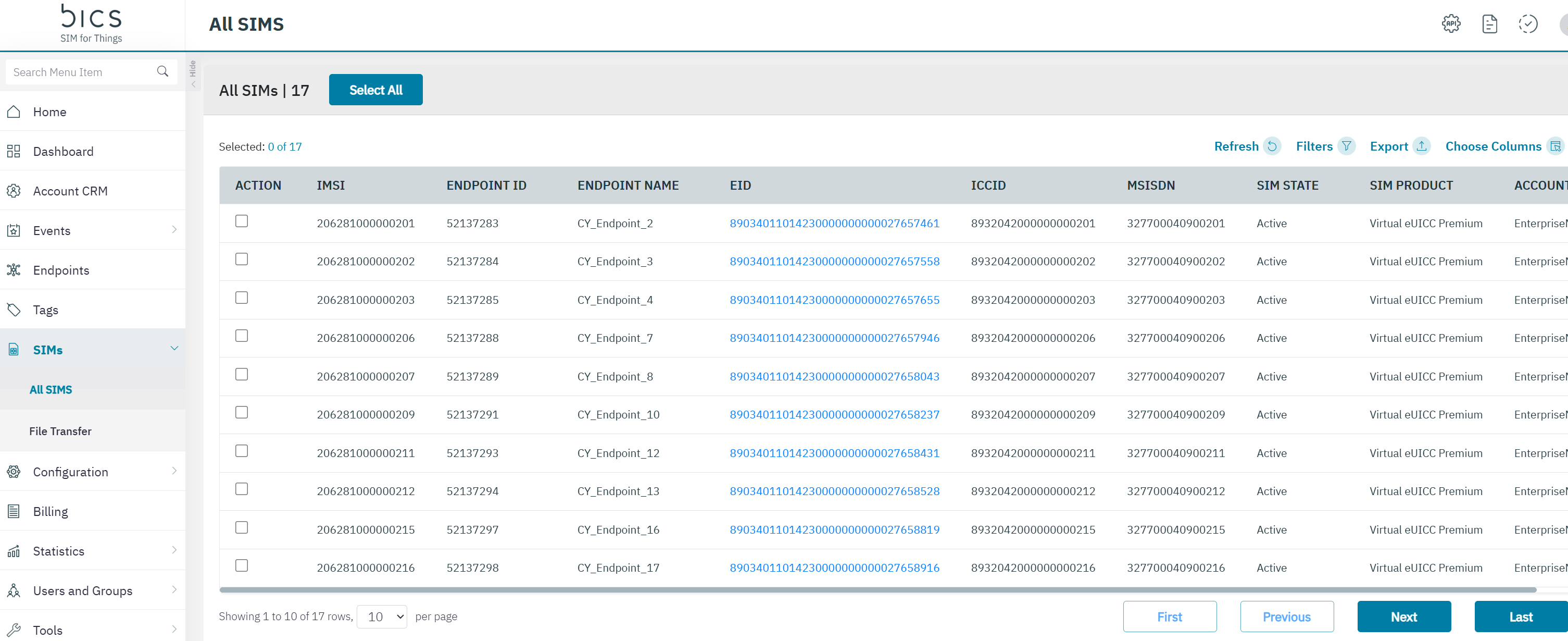
On the top menu, click SIMs to view the SIM details.
-
The following SIM details are displayed on the screen. Some columns are hidden by default and can be enabled or disabled via the Choose Columns.
|
Field |
Description |
Default visible |
|---|---|---|
|
ACTION |
This select button is linked to the Download the QR code button. You can download the QR codes for the selected SIM’s. |
YES |
|
SIM ID |
The unique identifier of the SIM card in the platform. |
NO |
|
IMSI |
Indicates the IMSI of the endpoint.
|
YES |
|
ENDPOINT ID |
Indicates the unique reference ID of the endpoint |
YES |
|
ENDPOINT NAME |
This is the name that you can give to your endpoint. |
YES |
|
EID |
|
YES |
|
ICCID |
ICCID indicates the serial number of the SIM. ICCID is a unique reference number given for each SIM. |
YES |
|
LAST SIM STATUS DATE TIME |
Whenever a SIM status changes from <any status> to <any status> a new parameter will hold the date and time of the event on the customer time zone.
|
NO |
|
MSISDN |
Indicates the MSISDN of the endpoint. |
YES |
|
SIM STATE |
Indicates the status of the SIM. |
YES |
|
SIM Product |
A SIM product is a combination of SIM electrical profile and physical parameters. |
YES |
|
EAN |
A 13-digit product identifier used for SIM inventory and provisioning workflows. |
NO |
|
FORM FACTOR |
Indicates the card class of the SIM. Form factor is a physical parameter.
|
NO |
|
ACCOUNT |
A SIM product is a combination of SIM electrical profile and physical parameters. |
YES |
|
DIRECT CUSTOMER |
Indicates if the SIM belongs to a direct enterprise customer. |
NO |
|
DATE TIME SINCE SIM NOT ACTIVATED |
Shows how long the SIM has remained inactive (timestamp or blank if never activated). |
No |
|
ACTIVATION CODE |
Unique SM-DP+ code required to activate the SIM. |
NO |
|
SM-DP+ PROFILE TYPE |
Specifies the eSIM profile type managed by the SM-DP+ system. |
NO |
|
SUPPLIER NAME |
Identifies the SIM card supplier or manufacturer. |
NO |