.jpg)
All SIMs
-
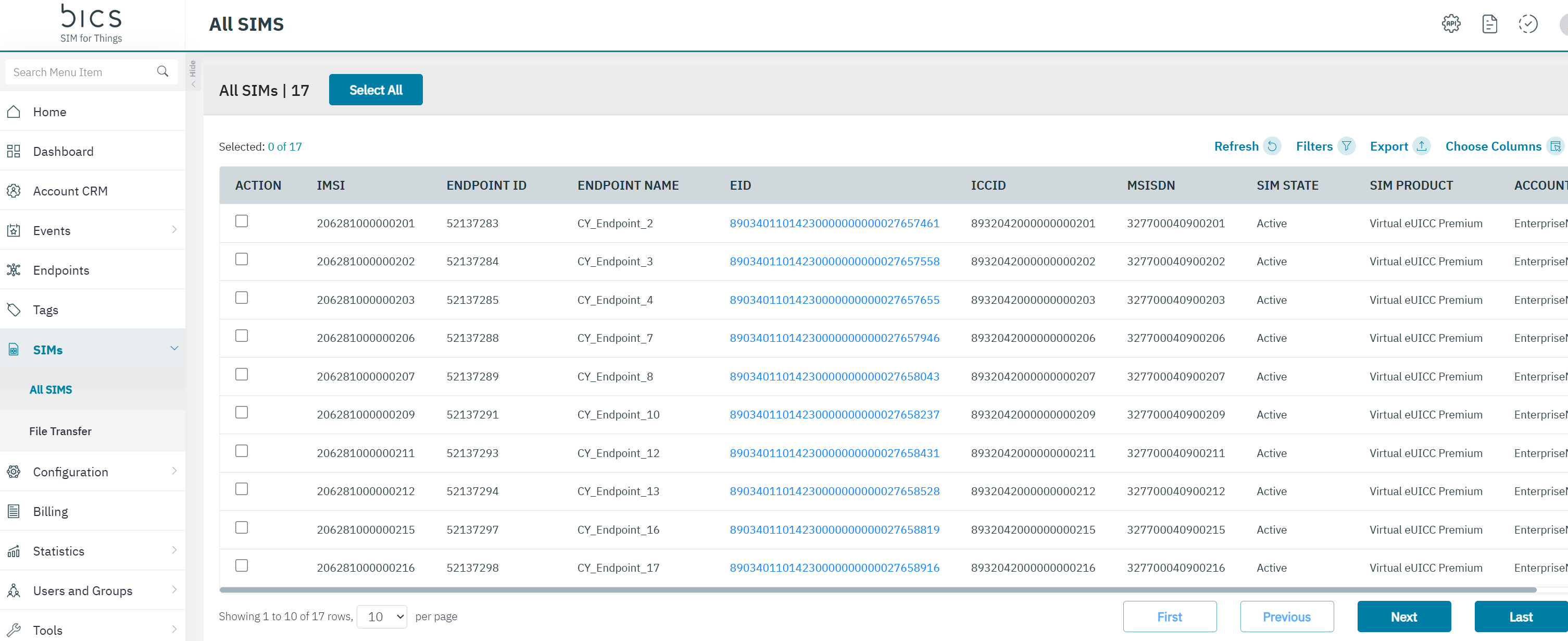
On the top menu, click SIMs to view the SIM details.
-
The following SIM details are displayed on the screen. Some columns are hidden by default and can be enabled or disabled via the Choose Columns.
|
Field |
Description |
Default visible |
|---|---|---|
|
ACTION |
This select button is linked to the Download the QR code button. You can download the QR codes for the selected SIM’s. |
YES |
|
SIM ID |
The unique identifier of the SIM card in the platform. |
NO |
|
IMSI |
Indicates the IMSI of the endpoint.
|
YES |
|
ENDPOINT ID |
Indicates the unique reference ID of the endpoint |
YES |
|
ENDPOINT NAME |
This is the name that you can give to your endpoint. |
YES |
|
EID |
|
YES |
|
ICCID |
ICCID indicates the serial number of the SIM. ICCID is a unique reference number given for each SIM. |
YES |
|
LAST SIM STATUS DATE TIME |
Whenever a SIM status changes from <any status> to <any status> a new parameter will hold the date and time of the event on the customer time zone. |
NO |
|
MSISDN |
Indicates the MSISDN of the endpoint. |
YES |
|
SIM STATE |
Indicates the status of the SIM. |
YES |
|
SIM Product |
A SIM product is a combination of SIM electrical profile and physical parameters. |
YES |
|
EAN |
|
NO |
|
FORM FACTOR |
Indicates the card class of the SIM. Form factor is a physical parameter. |
NO |
|
ACCOUNT |
A SIM product is a combination of SIM electrical profile and physical parameters. |
YES |
|
DIRECT CUSTOMER |
|
NO |
|
DATE TIME SINCE SIM NOT ACTIVATED |
|
No |
|
ACTIVATION CODE |
|
NO |
|
SM-DP+ PROFILE TYPE |
|
NO |
|
SUPPLIER NAME |
|
NO |
LAST SIM STATUS DATE TIME
|
OLD SIM STATUS |
CURRENT SIM STATUS |
LAST SIM STATUS DATE TIME |
|---|---|---|
|
<ordering> |
Ready To Activate |
Date time should be NULL |
|
<sim transfer> |
Ready To Activate |
Date time should be NULL *If we transfer from one account to another account we should reset/erase previous values |
|
Ready To Activate |
Pre-Active |
Date time will be set |
|
Ready To Activate Pre-Active |
Active-Test |
Date time will be set |
|
Ready To Activate Pre-Active Active-Test |
Active-Inventory |
Date time will be set |
|
Ready To Activate Pre-Active Active-Test Active-Inventory |
Active |
Date time will be set |
|
Active |
Suspend |
Date time will be set |
|
any other status |
Ready To Activate |
Date time will be set |
|
Active/SIM swap |
<void> |
The old sim should have an updated date time when the sim swap happened |