.jpg)
Modify endpoint from Pre-active to Active
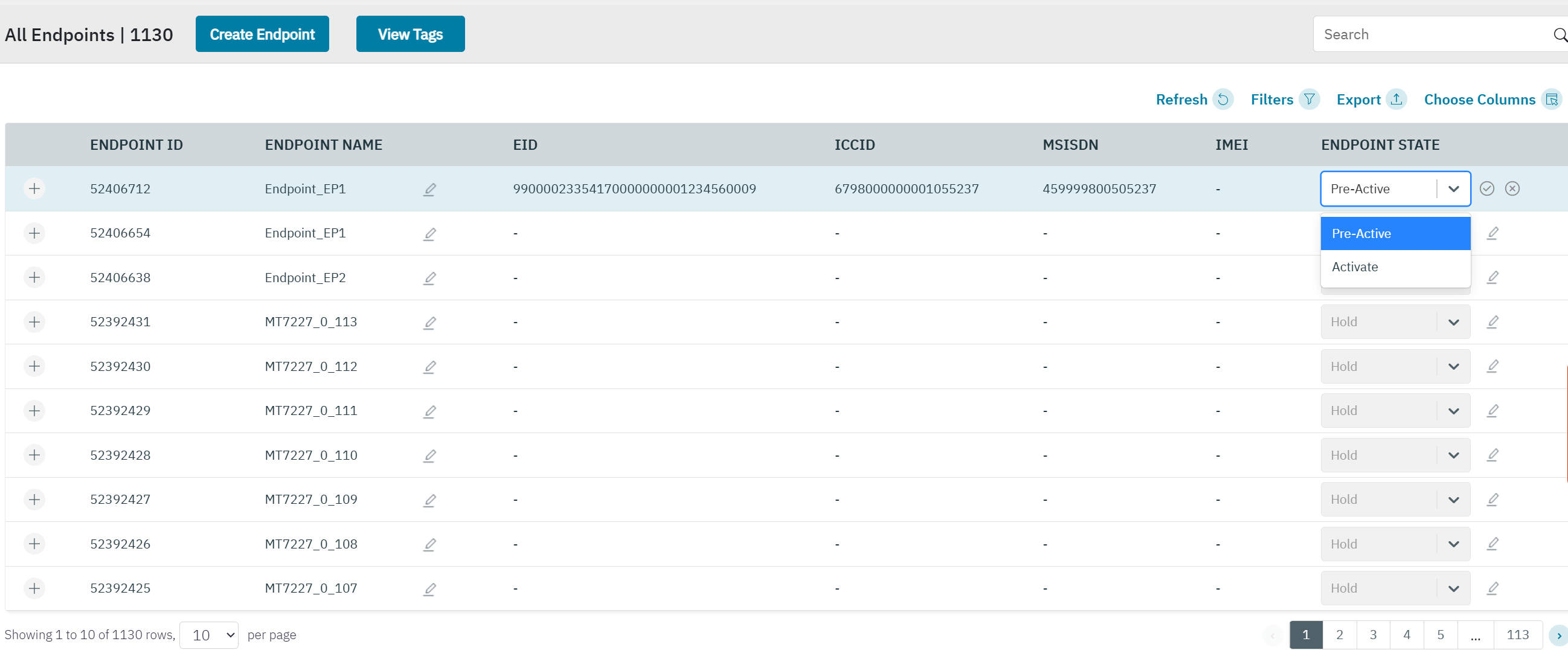
The enterprise can “activate” a SIM that is currently in "pre-active” status. An endpoint will be marked as "Pre-active" when its associated endpoint is created with the SIM attached, but the Endpoint has not yet been activated. In that case the "Activate Immediately" was also disabled during the endpoint creation.
When there is no SIM lined to the endpoint, then the endpoint state will be shown as “Hold”. In that case you need to link a SIM to the endpoint first. Link or De-link SIM to endpoint
-
On the top menu, click Endpoints to view the endpoint details. Click on the pencil icon and the Endpoint state drop-down list will display the “Pre-Active" and “Activate” options. Click “Activate” in the drop-down list to activate the SIM.
-
The "Alert Are you sure you want to continue.?" message will be shown.
-
Click Yes to confirm the action. A confirmation message is displayed indicating the lifecycle status of the endpoint is changed successfully.
-
Click No to discard the action.
-
The SIM status of the endpoint is changed to Active.