.jpg)
Endpoint Events
Lifecycle and configuration changes for SIMs/endpoints (e.g., activation). The last 6 months Endpoint Events will be available in this screen.
The Endpoint events are available in the UI and also via the API data streams. You can find more info on the Endpoint Events here: Endpoint data streams
-
Click on the Endpoint menu under the Events.
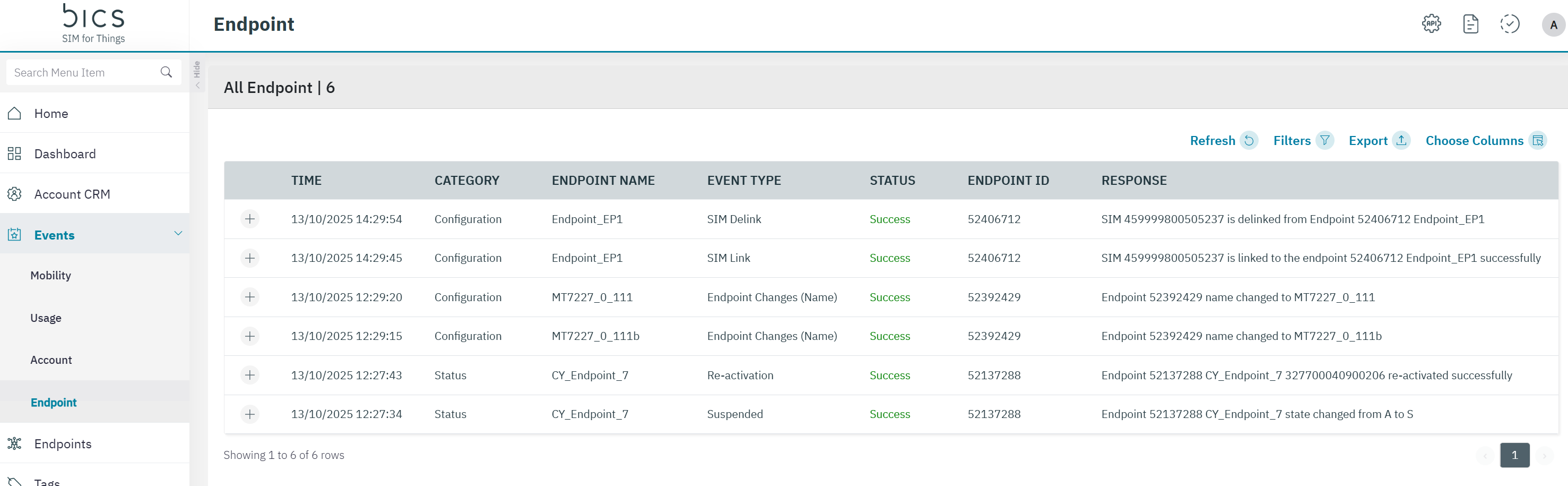
The following transaction details are displayed on the screen.
|
Field |
Description |
|---|---|
|
Time |
Indicates the date and time when the callback API event took place. Time is displayed in UTC standards |
|
Category |
Indicates the type of category event . For example Customer CRM |
|
Endpoint Name |
Indicates the Endpoint name of the events. |
|
Event Type |
Indicates the Event Type of the events .
|
|
Status |
Indicates the status of the callback API. |
|
Endpoint ID |
Indicates the Endpoint ID of the events. |
|
Response |
Indicates the HTTP Response of the events. |
|
IMSI |
by default hidden. The IMSIof the endpoint. |
|
ICCID |
by default hidden. The ICCID of the endpoint. |
|
MSISDN |
by default hidden. The MSISDNof the endpoint. |
|
Account ID |
by default hidden. The account ID used by yhe endpoint. |
Note: We are writing Endpoint events for Endpoint provisioning, Plan change, MDB activation, MDB deactivation, Add subscription, Addon deactivation, service profile modification, coverage modify, Counter update, Balance update, Bulk provision, endpoint modify and imei lock and unlock.
-
On the Endpoint screen, click on the “+” icon to view the quick description of the event.
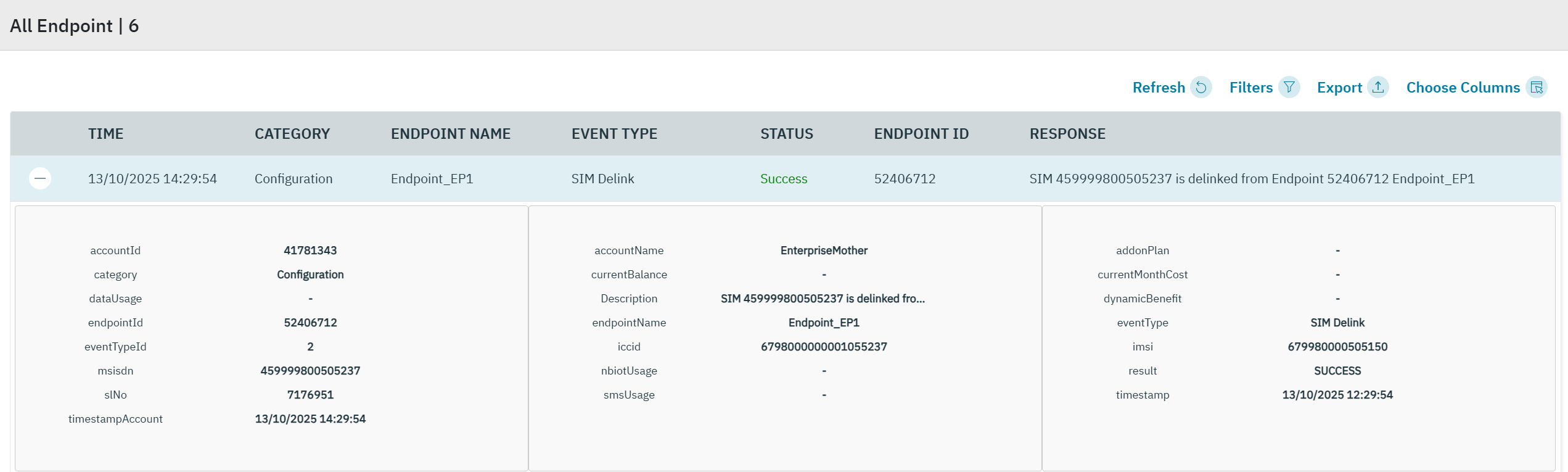
The following transaction details are displayed on the screen.
|
Field |
Description |
|---|---|
|
Endpoint ID |
Indicates the Endpoint ID |
|
Endpoint Name |
Indicates the Endpoint name |
|
Deletion Date & Time |
Indicates the date and time when the account deleted |
|
Status |
Indicates the Endpoint deleted status successful or failed? |
|
Plan assigned |
Indicates the assigned plan |
|
DataUsage |
Indicates the total data usage current month |
|
nbiotUsage |
Indicates the current month NB-IoT usage |
|
smsUsage |
Indicates the current month SMS usage |
|
currentMonthCost |
Indicates the cost current month value |
|
Monthly Limit/Balance |
Indicates the Monthly Limit/Balance |
|
Prepaid or Postpaid |
Indicates the Endpoint Prepaid or Postpaid |
|
dynamicBenefit |
Configured MDB name |
|
addonPlan |
Configured Addon name |
|
category |
|
|
eventTypeId |
|
|
msisdn |
|
|
slNo |
|
|
timestampAccount |
|
|
accountName |
|
|
currentBalance |
|
|
Description |
|
|
iccid |
|
|
eventType |
|
|
imsi |
|
|
result |
|
-
Click the filter icon to filter the results. You can filter on Start and End date, Operation Type , Status (Success / Failure), Category and Event type.
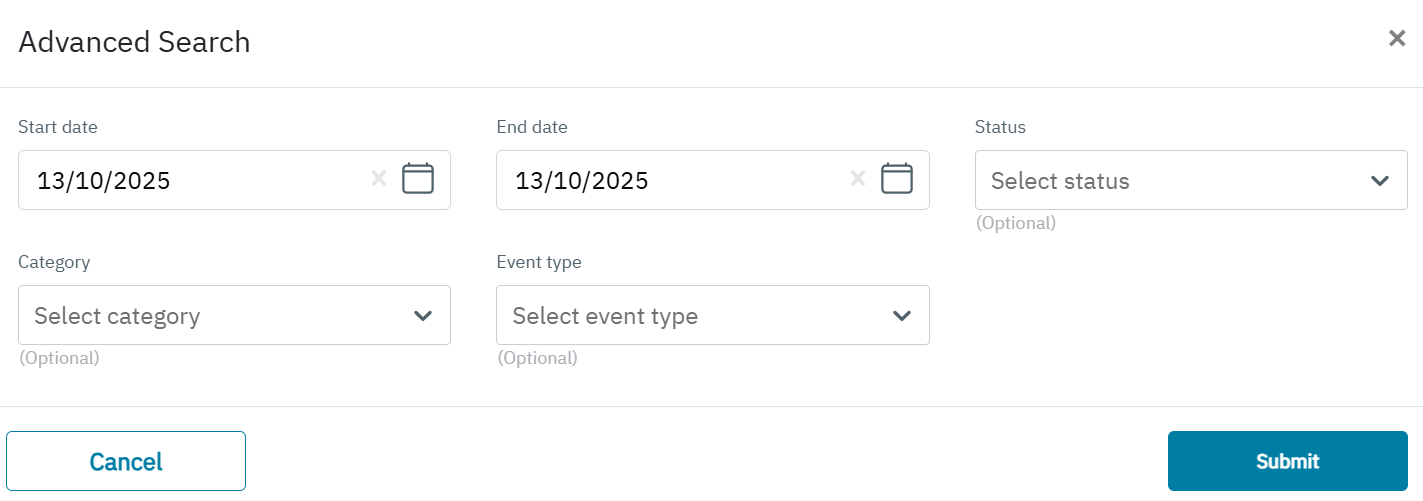
The following details are displayed on the screen.
|
Field |
Description |
|---|---|
|
Start Date |
Indicates the start date . |
|
End Date |
Indicates the end date |
|
Status |
Indicates the status of events . |
|
Category |
Indicates the type of category event .
|
|
Event Type |
Indicates the Event Type of the events
|