.jpg)
Usage Events
Data and SMS usage details, including volumes and message delivery status.
The Account events are available in the UI and also via the API data streams. You can find more info on the Account Events here: Usage data streams
-
Click on the Usage menu under the Events.
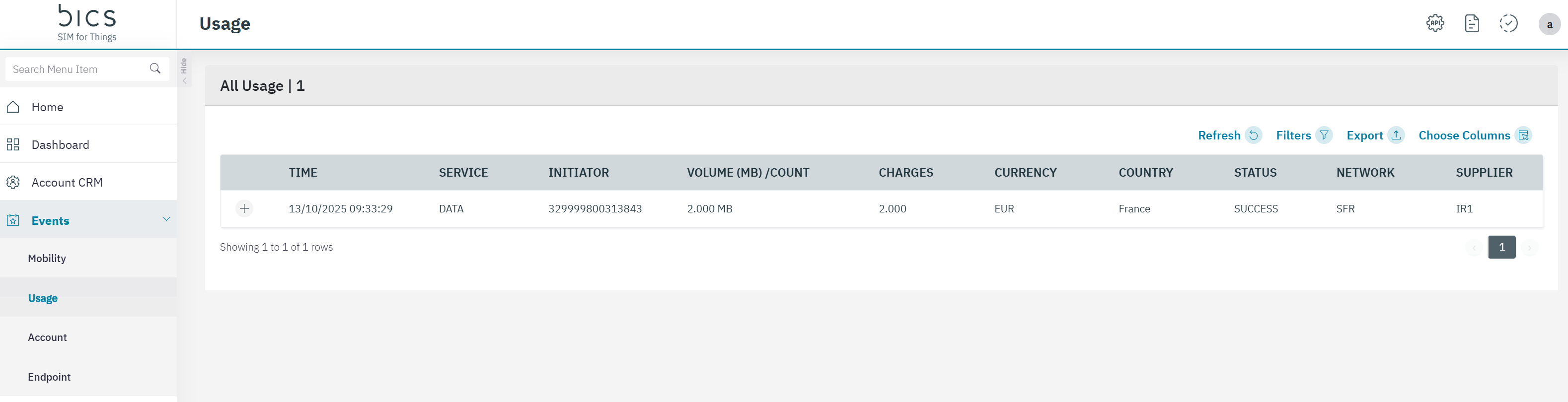
The following usage event details are displayed on the screen.
|
Field |
Description |
|---|---|
|
Time |
Indicates the date and time of the transaction |
|
Service |
Indicates the type of service. For example Data or SMS |
|
Initiator |
Indicates the MSISDN of the endpoint from where the transaction initiated |
|
Volume (MB)/Count |
If the service type is data, the volume of data consumed in Megabytes (MB) during the transaction is displayed. The value shall be displayed with 3 decimals.
|
|
Charges |
Indicates the charges for the transaction.The value shall be displayed with 3 decimals. |
|
Currency |
Indicates the currency of the enterprise. |
|
Country |
Indicates the originating country of the service. For example Belgium |
|
Status |
Indicates the status of the transaction. For example, Success or Failure |
|
Network |
Indicate the network used for the transaction. For example, Proximus. |
|
Supplier |
|
-
On the Usage screen, click on the “+” icon to view the quick description of the transaction.
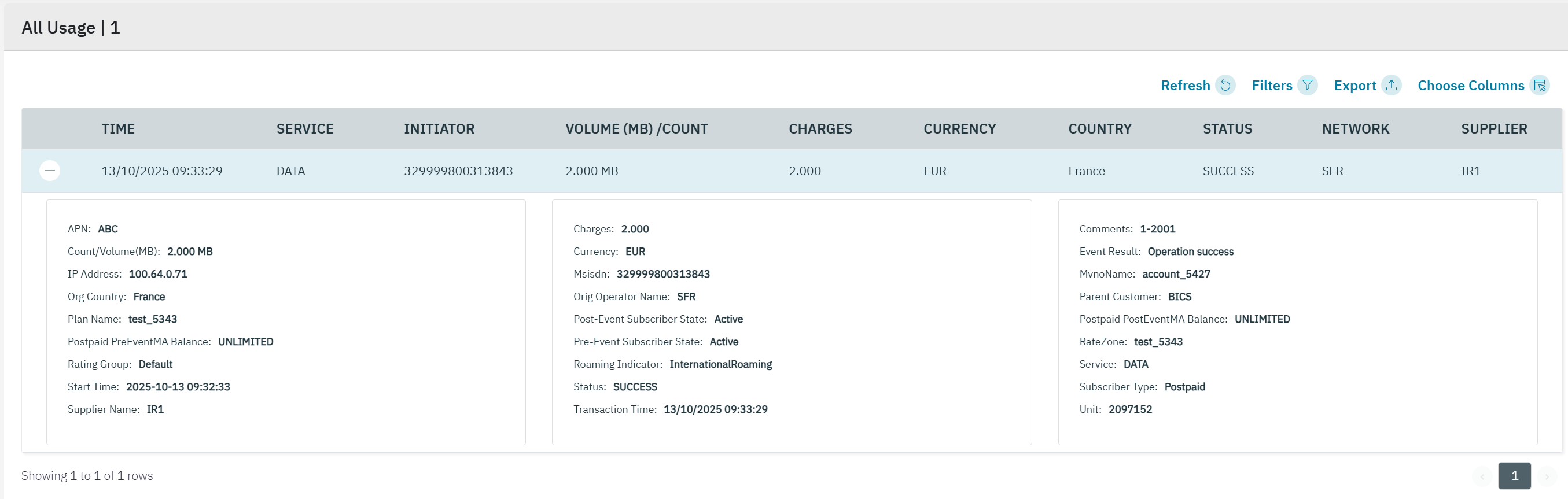
|
Field |
Description |
|---|---|
|
APN |
The APN used by the endpoint |
|
Count/Volume(MB) |
If the service type is data, the volume of data consumed in Megabytes (MB) during the transaction is displayed.The value shall be displayed with 3 decimals.
|
|
IP Address |
The IP address used by the endpoint |
|
Org Country |
Indicates the originating country of the transaction |
|
Plan Name |
Indicates the current base plan of the endpoint |
|
Postpaid PreEventMA Balance |
Indicates the account balance after transaction |
|
Rating Group |
Indicates the Rating group of the endpoint |
|
Start Time |
|
|
Supplier Name |
|
|
Charges |
Indicates the charges for the transaction.The value shall be displayed with 3 decimals. |
|
Currency |
Indicates the currency of the enterprise |
|
Msisdn |
Indicates the MSISDN of the endpoint.
|
|
Orig Operator Name |
Indicates the Originating operator name of the transaction |
|
Post-Event Subscriber State |
|
|
Pre-Event Subscriber State |
|
|
Roaming Indicator |
|
|
Status |
Indicates the status of the transaction. For example, Success or Failure. |
|
Transaction Time |
|
|
Comments |
|
|
Event Result |
Indicates the result of the transaction. |
|
MvnoName |
|
|
Parent Customer |
Indicates the parent customer name of the endpoint |
|
Postpaid PostEventMA Balance |
|
|
RateZone |
Indicates the Ratezone under which the transaction occurred |
|
RAT type |
Indicates the network type used for transaction. For example, 2G, 3G, 4G, or NBIOT |
|
Service |
Indicates the service type. For example, Data or SMS |
|
Subscriber Type |
Prepaid or postpaid |
|
Unit |
|
-
Click the filter icon to filter the results .
-
For the Transaction type: Usage, you can filter on Service Type and Start and End date.
-
For the Transaction type: Account you can filter on Start and End date.
-
For the Transaction type: Payment you can filter on Start and End date.
-
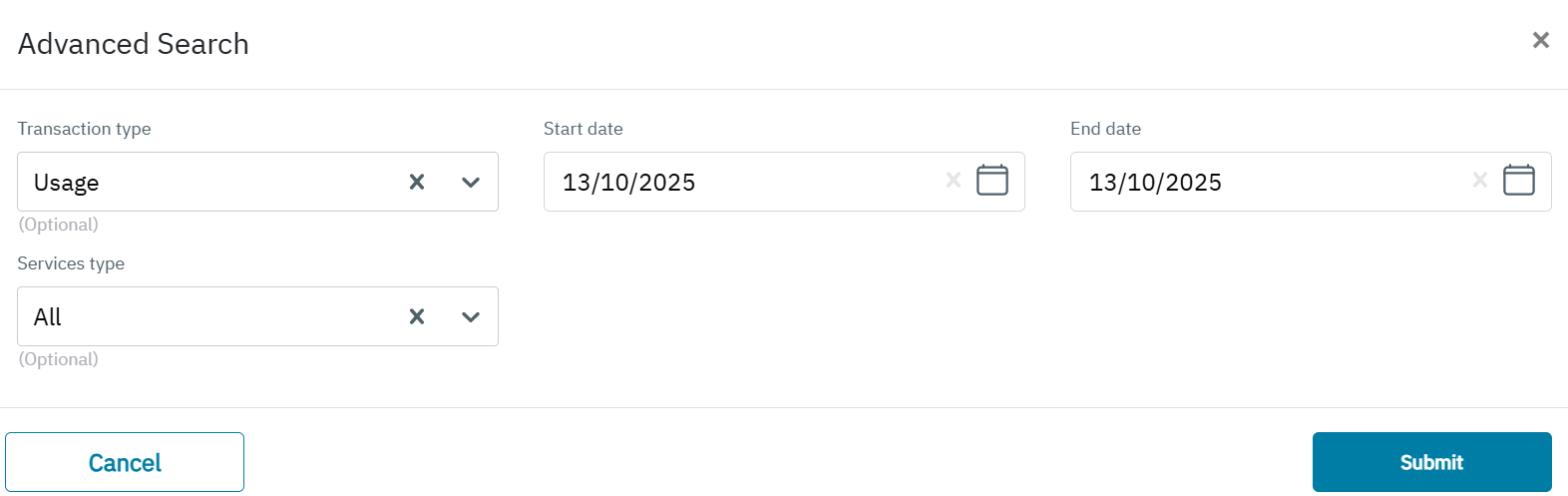
The following details are displayed on the screen.
|
Field |
Description |
|---|---|
|
Transaction type |
Usage, Account or Payment |
|
Start Date |
Indicates the start date . |
|
End Date |
Indicates the end date |
|
Service Type |
Only id Transaction type = Usage
|