.jpg)
Set or Change the APN
When you onboard an account and attach a plan, the platform automatically assigns bicsapn as the default APN.
However, you can change this before assigning the base plan.
How to Modify the Default APN
-
During the provisioning process, use the APN selection option to review or update the APNs.
-
Click the pencil icon to:
-
Add or remove APNs.
-
Change the default APN.
-
-
Important: Once the base plan is assigned:
-
The DEFAULT APN for DEFAULT APN GROUP field becomes non-editable.
-
You can still modify the APN list, but not the default APN.
-
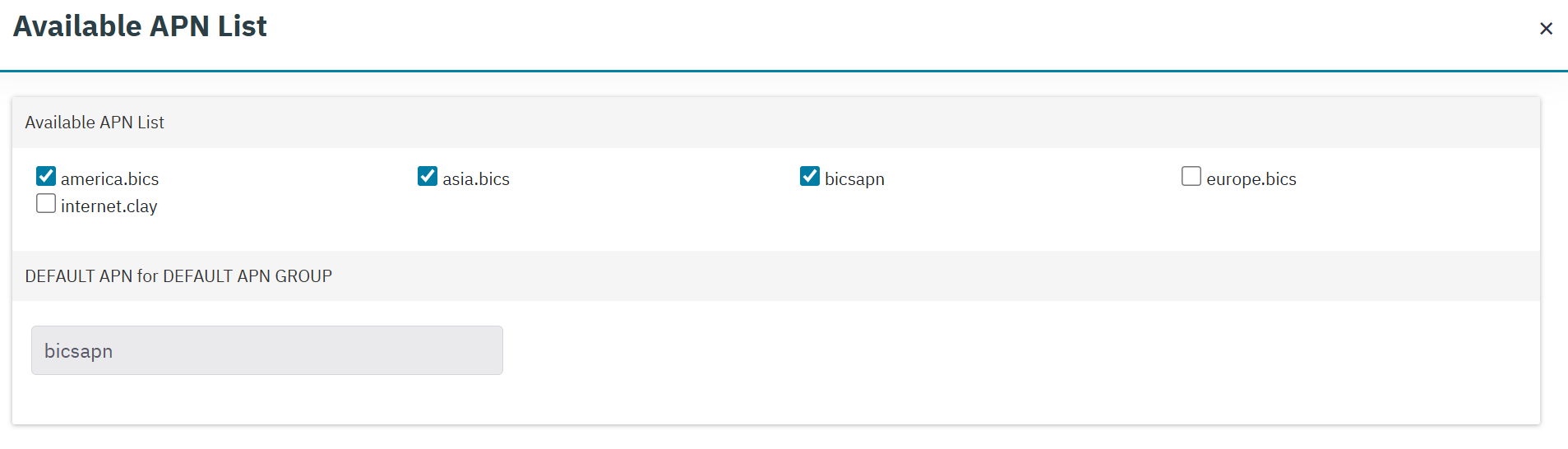
Available APNs List
-
You must attach at least one APN before assigning the base plan. This step is mandatory.
Enterprise Customers (Account CRM)
-
In the Available APNs List, the field DEFAULT APN for DEFAULT APN GROUP is visible.
Use this to set the default APN group.
Reseller Customers (Account CRM)
-
In the Available APNs List, the field DEFAULT APN for DEFAULT APN GROUP is not visible.